


Hey there, tech enthusiasts! As a supplier of GaN chargers designed specifically for MacBooks, I often get asked a bunch of questions about how these chargers work, especially when it comes to charging multiple devices at once. One of the most common queries is, "Can a GaN charger for MacBook charge my MacBook while it's charging other devices?" Let's dig into this topic and find out.
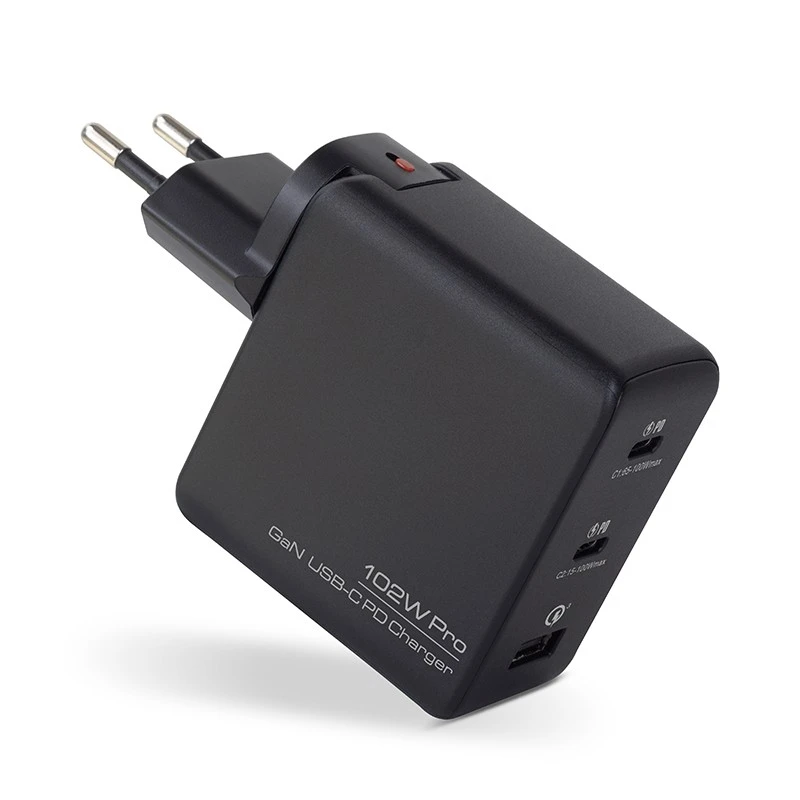

First off, let's talk a bit about GaN chargers. GaN stands for Gallium Nitride, a semiconductor material that's been revolutionizing the charger industry. Compared to traditional silicon chargers, GaN chargers are smaller, lighter, and more efficient. They can handle higher power levels without generating as much heat, which is a huge plus, especially for high - power devices like MacBooks.
Now, back to the main question. The short answer is yes, a GaN charger for MacBook can charge your MacBook while it's charging other devices. But, there are a few things you need to know to make sure everything works smoothly.
How GaN Chargers Distribute Power
GaN chargers usually come with multiple ports, like USB - C and USB - A ports. These ports can charge different devices simultaneously, but the charger has a total power output limit. For example, if you have a High Output GaN Charger with a total output of 100W, and your MacBook needs 60W to charge at full speed, and you're also trying to charge a smartphone that needs 10W, the charger will distribute the power accordingly.
Most GaN chargers are smart enough to detect the power requirements of each device and adjust the power output to each port. So, in our example, the charger will send 60W to the MacBook and 10W to the smartphone, leaving 30W available for other devices if you have more plugged in.
Factors Affecting Charging Performance
- Device Compatibility: Not all devices are created equal. Some older devices might not support fast charging or might not be able to communicate properly with the charger. This can affect how the charger distributes power. For instance, if you plug in an old smartphone that only supports 5W charging, the charger will only send 5W to that device, even if there's more power available.
- Total Power Demand: If you try to charge too many high - power devices at once, you might exceed the charger's total power output. For example, if you have a 100W GaN Charger and you plug in a MacBook that needs 60W, a tablet that needs 30W, and a power - hungry external hard drive that needs 20W, the total power demand (110W) exceeds the charger's capacity. In this case, the charger will either reduce the power output to some devices or might not be able to charge all the devices at the same time.
- Cable Quality: The quality of the charging cables you use also matters. A poor - quality cable might not be able to carry the required power, which can slow down the charging process or even cause the charger to malfunction. Always use high - quality cables that are compatible with your devices and the charger.
Benefits of Charging Multiple Devices with a GaN Charger
- Convenience: Instead of carrying around multiple chargers for your MacBook, smartphone, tablet, and other devices, you can use a single GaN charger. This is especially useful when you're traveling or working on the go.
- Energy Efficiency: GaN chargers are more energy - efficient than traditional chargers. By using a single charger to charge multiple devices, you're reducing your overall energy consumption and helping the environment.
- Cost - Effective: Buying a single high - quality GaN charger can be more cost - effective in the long run than buying multiple chargers for each device.
Tips for Charging Multiple Devices
- Prioritize Devices: If you have multiple devices to charge and the charger's power output is limited, prioritize the devices based on their importance. For example, if you need to use your MacBook for work, make sure it gets enough power by unplugging less important devices.
- Use the Right Ports: Some GaN chargers have different ports with different power outputs. For example, a USB - C port might be able to provide more power than a USB - A port. Make sure you plug your high - power devices into the ports that can handle the power requirements.
- Monitor Charging Times: If you notice that your devices are taking longer to charge than usual when charging multiple devices at once, it might be a sign that the charger is struggling to distribute the power. Try unplugging some devices and see if the charging speed improves.
Our GaN Chargers for MacBooks
At our company, we offer a range of GaN chargers for MacBooks, including the Quick Charge GaN Adapter. Our chargers are designed to be efficient, reliable, and safe. They're also compatible with a wide range of devices, so you can charge your MacBook, smartphone, tablet, and other devices all at once.
Our chargers come with advanced safety features, like over - current protection, over - voltage protection, and short - circuit protection. This ensures that your devices are safe from any potential damage while charging.
Conclusion
In conclusion, a GaN charger for MacBook can definitely charge your MacBook while it's charging other devices. However, you need to be aware of the charger's power output limit, device compatibility, and cable quality to ensure optimal charging performance.
If you're interested in our GaN chargers for MacBooks or have any questions about charging multiple devices, feel free to reach out to us. We're always happy to help you find the right charger for your needs. Whether you're a casual user or a professional on the go, our GaN chargers can provide the convenience and performance you're looking for. So, don't hesitate to contact us for more information or to start a procurement discussion.
References
- Industry reports on GaN charger technology
- Manufacturer specifications of GaN chargers


